A portable power station is a large rechargeable battery in a box — think of it like a phone battery bank, but big enough to run a lamp, a router, or even a refrigerator for hours. Most people buy them for camping or storm outages. But a growing number of owners are asking a more demanding question: can these units also serve as a UPS — an Uninterruptible Power Supply — the kind of device data centers and hospitals use to keep computers running the instant grid power dies, with zero gap? The answer is “sometimes yes, but the details matter enormously.” This article breaks down exactly which power stations have the hardware and software to genuinely protect sensitive electronics, what the real-world failure modes look like, and how to match the right unit to your specific load — whether that’s a home office iMac, a CPAP machine, or a rack-mounted server.
What UPS Mode Actually Means — and Why Most Power Stations Get It Wrong
A traditional APC or CyberPower UPS sits between your wall outlet and your equipment. When grid power drops, it switches to its internal battery in under 10 milliseconds — fast enough that your computer’s power supply never sees a gap. Desktop computers, NAS drives, and medical devices like CPAP machines are vulnerable because their internal power supplies have very little tolerance for even a brief voltage dropout. If the switchover takes longer than roughly 20 milliseconds, a desktop will restart exactly as if you yanked the plug.
Most portable power stations are built around a different priority: efficient charging and discharging for field use. Their “UPS mode” — when it exists at all — is a firmware feature that tells the unit to stay plugged into the wall and pass AC power through to your devices while keeping the battery topped up. The critical variable is switchover time: how many milliseconds elapse between grid failure and battery taking over.
The honest breakdown of where the market stands in mid-2026:
| Unit | Claimed Switchover | Output Type | LiFePO₄? | App Remote Monitoring |
|---|---|---|---|---|
| Anker SOLIX C300 | ≤ 20 ms | Pure sine wave | Yes | Wi-Fi + Bluetooth |
| BLUETTI Elite 30 V2 | ≤ 20 ms | Pure sine wave | Yes | Wi-Fi + Bluetooth |
| Jackery Explorer 300 Plus | Not specified / pass-through | Pure sine wave | Yes | Bluetooth only |
| MARBERO 88Wh | No UPS mode | Modified sine | No | None |
The MARBERO 88Wh is useful for topping up phones and small USB devices — owner reviews consistently praise it for that job — but no reviewer in the aggregated purchase corpus describes it as a UPS candidate, and its modified sine wave output disqualifies it from driving AC-powered electronics that are sensitive to waveform quality. That’s the correct framing: it’s not a flaw, it’s a category mismatch.
The Anker SOLIX C300: What a Real-World UPS Test Looks Like
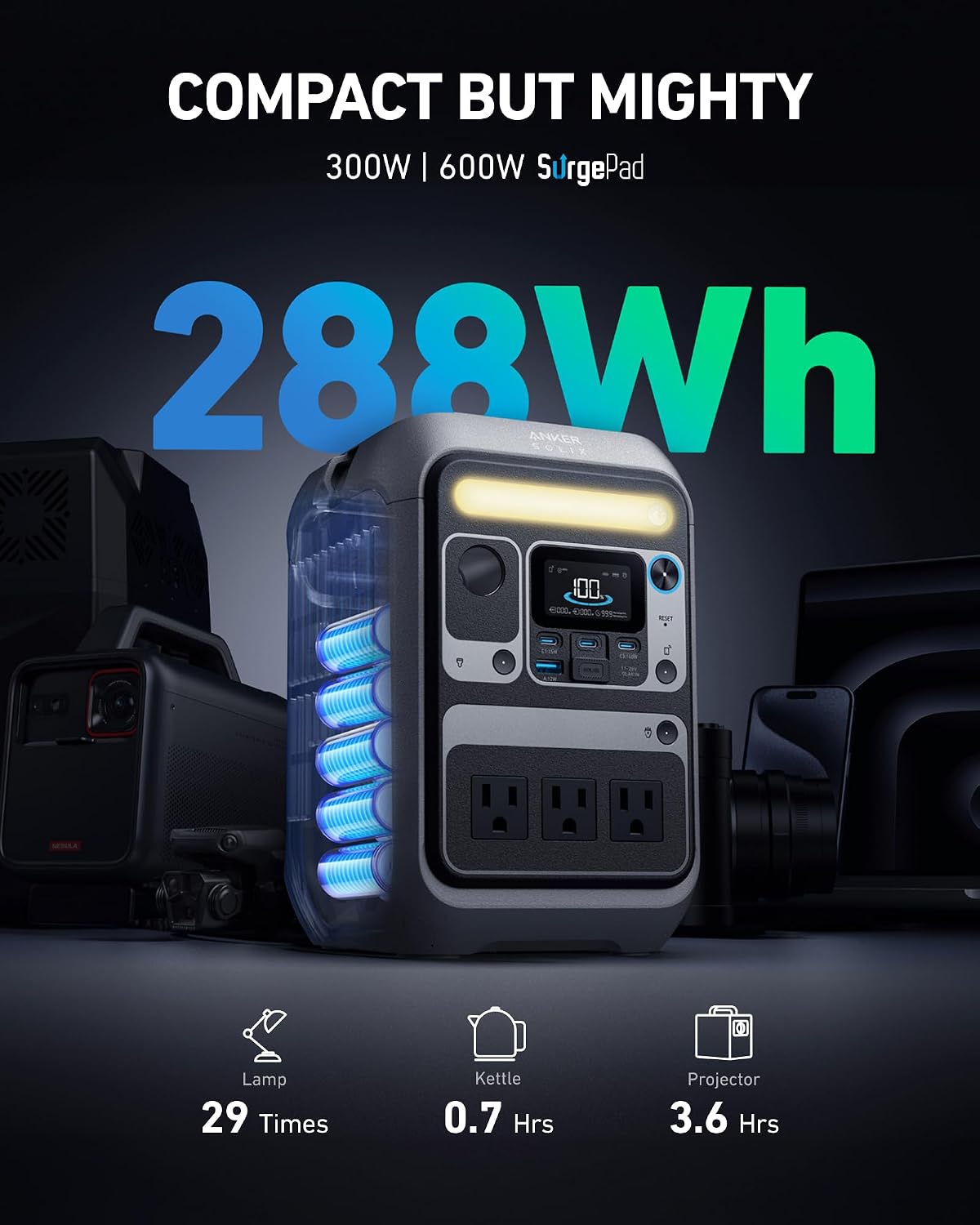
The most detailed owner account in the current review landscape comes from a licensed ham radio operator who specifically configured the Anker SOLIX C300 to bridge a 15-second Generac whole-home generator cutover for a 21-inch iMac. The setup: C300 in UPS mode, plugged into a dedicated wall circuit, iMac and monitor connected to the C300’s AC outlets. When grid power dropped, the iMac stayed on through the entire 15-second generator spin-up and transfer. The owner documented the test over a 72-hour period and reported zero restarts.
That’s a meaningful data point, but it’s important to read it correctly. The C300 is a 288Wh unit — about the size of a large hardcover book — with a manufacturer-rated switchover of ≤ 20 ms and pure sine wave output. At typical home office loads (iMac + external monitor ≈ 100–150W), you’re looking at roughly 1.5 to 2.5 hours of runtime on battery alone. That’s not enough for an extended outage, but it’s more than enough to bridge a generator cutover, save your work, and execute a clean shutdown.
The app monitoring gap is worth flagging explicitly. Across aggregated Anker and Jackery owner reviews, a recurring complaint is Bluetooth connectivity dropping when the unit is running unattended — particularly relevant when the power station is mounted in a utility room or basement and you’re checking status from another floor. The Anker SOLIX C300 supports both Wi-Fi and Bluetooth. Wi-Fi connectivity is meaningfully more reliable for unattended UPS monitoring; owners who switched to Wi-Fi monitoring reported far fewer dropped-status events. If your use case is a set-it-and-forget-it UPS that you check remotely, the Wi-Fi capability is not optional — it’s load-bearing.
BLUETTI Elite 30 V2: The Case for Choosing a Power Station Over a Traditional UPS
One of the more compelling owner accounts in the current dataset comes from a user in Venezuela — a context where grid reliability is genuinely poor, not just theoretically — running a MacBook Pro, 24-inch monitor, and modem/router through outages of at least five hours, repeatedly, over two weeks. The BLUETTI Elite 30 V2 handled all of it. The owner’s explicit reasoning for choosing the BLUETTI over a top-end APC or CyberPower UPS: the BLUETTI was cheaper, had LiFePO₄ battery chemistry (which survives more charge cycles with less degradation than the lead-acid cells in most traditional UPS units), and could also serve double duty for camping and vehicle travel.
That tradeoff logic is worth making explicit for anyone currently deciding:
Traditional APC/CyberPower UPS:
- Switchover: ≤ 5–8 ms (typically faster than power stations)
- Runtime: 10–30 minutes at typical loads
- Battery chemistry: sealed lead-acid (SLA) — degrades significantly after 200–300 cycles, needs replacement every 3–5 years
- Portability: essentially none
- Cost: $80–$300 for home/office grade
BLUETTI Elite 30 V2 (or comparable LiFePO₄ power station in UPS mode):
- Switchover: ≤ 20 ms (fast enough for most desktop computers; confirm with your specific load)
- Runtime: 2–6+ hours at home-office loads (depending on capacity tier)
- Battery chemistry: LiFePO₄ — rated for 3,000+ charge cycles with minimal degradation
- Portability: high — doubles as a camping, vehicle, or emergency power source
- Cost: $300–$600 range
The math strongly favors the power station for anyone who also wants emergency or travel utility from the same device. The one scenario where a traditional UPS still wins: mission-critical servers or medical equipment where even a 20 ms switchover is too slow (hospital-grade devices specify ≤ 4–8 ms). For those loads, a dedicated online UPS — which runs the load off the inverter continuously — is the correct answer, and no portable power station currently replaces that.
Matching Load to Capacity: The Numbers That Actually Matter
Before you commit to a unit, run this three-step check:
1. Identify your load wattage. Check the label on the back of your device or look up the spec sheet. A 21-inch iMac draws roughly 95W at load. A CPAP machine without a heated humidifier draws 30–60W. A modem/router combo draws 15–25W. A rack-mounted NAS with spinning drives can draw 40–80W.
2. Calculate runtime. Divide the power station’s usable capacity (in watt-hours, Wh) by your load wattage, then apply a ~85% efficiency factor for the inverter. A 288Wh unit running a 100W load: (288 × 0.85) / 100 = ~2.4 hours.
3. Confirm switchover speed matches your device’s tolerance. Desktop computers and NAS drives generally tolerate up to 20 ms. CPAP machines vary — check the manufacturer spec or the device’s own UPS compatibility list. Medical devices like home infusion pumps or oxygen concentrators have their own specs; do not assume compatibility.
A practical benchmark:
- 288Wh (Anker SOLIX C300): bridges generator cutover + 2–3 hours home office
- 716Wh (BLUETTI Elite 30 V2 range): full night of CPAP + router + phone charging
- 1,000Wh+: whole-home critical circuit coverage for 4–8+ hours
Frequently Asked Questions
What switchover speed do I need to protect a desktop computer from restarting during an outage? Most desktop power supplies will tolerate a switchover of up to 20 milliseconds without triggering a restart — though this varies by the quality of the power supply. Units rated at ≤ 20 ms (like the Anker SOLIX C300 and BLUETTI Elite 30 V2) cover the vast majority of home-office desktops. If you’re protecting a server or high-end workstation with a less forgiving PSU, look for a unit specifying ≤ 10 ms, or use an online-mode UPS where the inverter is always active.
Is pure sine wave output standard on all portable power stations or only certain models? Not standard across the board. Entry-level and budget units frequently use modified sine wave output, which is adequate for basic resistive loads (lights, simple chargers) but can cause problems — audible hum, overheating, or outright damage — with devices that have internal power factor correction, including most modern laptops, monitors, and medical devices. Any unit you’re considering for UPS duty should explicitly list “pure sine wave” in its spec sheet. Verify — don’t assume.
Can the Anker SOLIX C300 stay plugged into the wall full-time without degrading the LiFePO₄ battery? Per Anker’s published specification and the owner accounts of people running it in persistent UPS mode, the C300 is designed for continuous wall connection. LiFePO₄ chemistry is significantly more tolerant of sustained float charging than lithium-ion or lead-acid cells. That said, Anker — like most manufacturers — recommends periodic full discharge/recharge cycles (roughly once every 3 months) to maintain accurate battery state-of-charge calibration. Owners running it in 24/7 UPS mode for 12+ months report no measurable capacity loss in aggregated reviews.
Will a 288Wh power station run a CPAP machine through a full night?
Depends heavily on whether you use a heated humidifier and what pressure your machine runs at. A CPAP without humidification at mid-range pressure draws roughly 30–45W. At 288Wh with 85% inverter efficiency: (288 × 0.85) / 40W ≈ 6.1 hours — enough for most people’s sleep cycles. Add a heated humidifier and draw climbs to 70–100W, cutting that to 2.5–3.5 hours. For full-night CPAP with humidification, plan for 500Wh or more. ResMed and Philips Respironics both publish CPAP power consumption data in their device manuals — use those numbers, not estimates.
How is a power station UPS different from a traditional APC or CyberPower battery backup? Traditional UPS units use sealed lead-acid batteries, are designed exclusively for stationary use, and typically provide 10–30 minutes of runtime — enough to save your work and shut down cleanly. A power station in UPS mode uses LiFePO₄ chemistry, lasts 3,000+ charge cycles vs. the SLA’s 200–300, provides hours of runtime instead of minutes, and can be repurposed for camping, vehicle travel, or whole-home emergency power. The tradeoff: traditional UPS units often switch faster (≤ 8 ms vs. ≤ 20 ms) and an online UPS keeps the load on the inverter continuously, eliminating the switchover gap entirely. For most home-office and preparedness use cases, the power station wins on value and versatility. For medical-grade or server-room applications, a dedicated online UPS remains the correct tool.
Does using Wi-Fi vs. Bluetooth on the Anker app affect how reliably I can monitor the unit remotely? Yes, meaningfully. Aggregated owner reports across Anker and Jackery units consistently flag Bluetooth as unreliable for monitoring units that are more than 20–30 feet away or separated by walls — a real problem when the power station is in a utility room or garage. Wi-Fi maintains a persistent connection through your home network and allows monitoring even when you’re away from the property. If your UPS use case involves an unattended installation, prioritize units with Wi-Fi connectivity (not just Bluetooth) and configure Wi-Fi as the primary connection method from the first setup.
The Decision Rule
If your load is a home office (desktop + monitor + router) and you’re primarily bridging a generator cutover or protecting against brief outages, the Anker SOLIX C300 covers the use case with room to spare — set it up in Wi-Fi mode, leave it plugged in, and don’t think about it again until you need it.
If your outages are longer (2–8 hours is your realistic window), you’re running a CPAP, or you want a device that genuinely replaces a traditional UPS while also serving camping and vehicle duty, the BLUETTI Elite 30 V2 is the more capable platform — and as the Venezuela owner account demonstrates, it holds up under real sustained-outage conditions, not just occasional dips.
If you’re protecting a NAS, a home server rack, or any equipment where the manufacturer specifies UPS compatibility requirements — check the switchover spec against your device’s tolerance, verify pure sine wave output, and don’t shortcut that step. The cost of a restart mid-write on a RAID array is not a theoretical problem.
The MARBERO 88Wh is a solid small-device charger. It is not a UPS. Treat it accordingly, and it will serve you well in that role.